

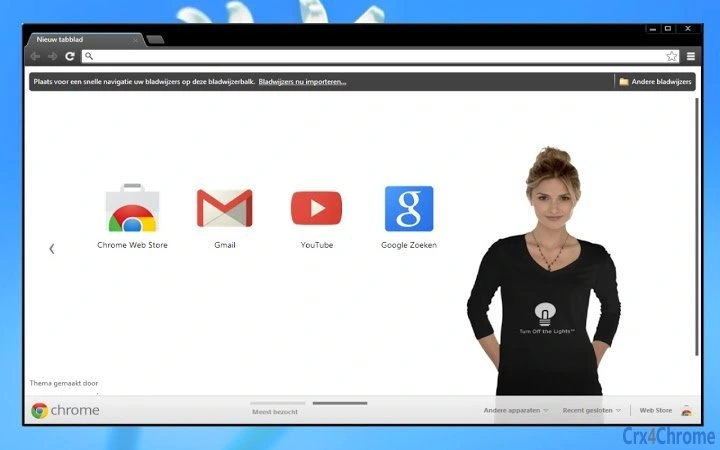
Description
Dark Browser Theme with Eye Protection
Overview
The Turn Off the Lights Chrome extension offers a dark browser theme designed to reduce eye strain and enhance nighttime browsing. Built with eye protection in mind, it mimics the deep black aesthetic of the popular Turn Off the Lights™ extension, providing a consistent visual experience across the browser interface. This tool is ideal for users who spend extended hours online, especially during evening or low-light conditions.
It targets professionals, students, and casual internet users who prioritize visual comfort and reduced screen brightness. The extension integrates seamlessly into the Chrome ecosystem, offering a simple yet effective solution for improving digital well-being. While the developer did not provide additional details about the development background, the extension is associated with a dedicated project website and active social media presence.
Real-world usage scenarios include reading articles late at night, working on digital content under dim lighting, or simply reducing screen glare during evening hours. The theme applies globally to the browser’s UI, including the omnibox and tab bar, creating a unified dark environment that minimizes visual fatigue.
Key Features & Capabilities
- Dark Theme Integration – Applies a deep black color scheme to the Chrome browser interface, including the omnibox, tab bar, and toolbar, reducing screen brightness and glare.
- Eye Protection Focus – Designed to help prevent eye strain and support healthy screen habits during prolonged use, especially in low-light environments.
- Consistent Aesthetic – Matches the visual style of the Turn Off the Lights™ extension, ensuring a cohesive user experience across tools.
- Universal Browser Compatibility – Works across all major platforms supported by Chrome, including Windows, Mac, and Linux.
- Simple Activation – Once installed, the theme applies immediately with no additional configuration required.
Users can benefit from a more comfortable browsing experience when reading long articles, watching videos, or working on documents in the evening. The dark interface reduces visual distractions and helps maintain focus, particularly in dimly lit rooms. The theme does not alter web content, preserving original site designs while only affecting the browser’s UI.
User Interface, Workflow & Performance
The user interface of the Turn Off the Lights theme is minimal and focused on functionality. It replaces the default Chrome theme with a solid black background across the browser’s toolbar, omnibox, and tab area. Navigation remains consistent with standard Chrome behavior, ensuring no disruption to established workflows.
Installation and activation are straightforward—users simply install the extension from the Chrome Web Store, and the theme applies instantly. No settings or configuration steps are required, making it accessible even for non-technical users. The workflow is efficient and immediate, with no delays or loading screens.
Performance details were not specified by the developer. However, based on general behavior of lightweight browser themes, the extension is expected to have minimal impact on CPU or RAM usage. The developer did not provide information on stability or long-term performance under heavy usage.
Compatibility & System Requirements
The extension is compatible with Windows, Mac, and Linux operating systems, ensuring broad accessibility across desktop environments. It requires Google Chrome as the host browser, which is standard for Chrome extensions.
The installation size is 1.5 MB, indicating a lightweight footprint. The developer did not specify exact system requirements such as minimum RAM, processor speed, or available disk space. Compatibility information was partially provided, with no mention of older Chrome versions or specific hardware configurations.
Users should ensure their Chrome browser is up to date to maintain full functionality. The extension is designed to function within the Chrome extension framework, relying on standard browser APIs.
Pros and Cons
Pros
- Instant dark theme application with no configuration needed
- Effective for reducing screen brightness and eye strain
- Consistent with the visual style of the Turn Off the Lights™ extension
- Lightweight at only 1.5 MB in size
- Available for Windows, Mac, and Linux users
Cons
- No customization options for theme colors or intensity
- Only works within the Chrome browser environment
- Performance and resource usage details were not provided
- Requires Chrome, limiting cross-browser compatibility
- Only affects browser UI, not website content
FAQ Section
Is this extension compatible with all versions of Chrome?
The extension is designed for current Chrome versions. Users are advised to keep their browser updated for optimal performance and compatibility.
Can I use this theme on browsers other than Chrome?
Currently, this theme is only available for Google Chrome. It does not support other browsers such as Firefox, Edge, or Safari.
Is the extension safe to install?
Yes, the extension is hosted on the official Chrome Web Store and is verified by Google. It does not collect personal data or install additional software.
How do I uninstall the theme?
To reset to the default Chrome theme, go to Settings > Appearance > Reset to default theme. This removes the dark theme and restores the original interface.
Does this extension affect website content?
No, the extension only modifies the browser’s user interface. Website content remains unchanged and unaffected by the theme.
Final Thoughts
The Turn Off the Lights Chrome extension delivers a focused, no-frills solution for users seeking a dark browser theme with eye protection benefits. Its seamless integration, instant application, and lightweight design make it a practical choice for nighttime browsing. While it lacks customization and is limited to Chrome, its core purpose is fulfilled effectively.
It is particularly beneficial for professionals and students who work late, or anyone looking to reduce screen glare in low-light settings. The consistent aesthetic with the main extension enhances brand coherence and user trust.
Download Turn Off the Lights now and transform your browsing experience with a darker, more comfortable interface.
Guides & Tutorials for Turn Off the Lights Theme for Chrome
How to install Turn Off the Lights Theme for Chrome
- Click the Preview / Download button above.
- Once redirected, accept the terms and click Install.
- Wait for the Turn Off the Lights Theme for Chrome download to finish on your device.
How to use Turn Off the Lights Theme for Chrome
This software is primarily used for its core features described above. Open the app after installation to explore its capabilities.
User Reviews for Turn Off the Lights Theme for Chrome 0
No reviews found





